
| 일 | 월 | 화 | 수 | 목 | 금 | 토 |
|---|---|---|---|---|---|---|
| 1 | 2 | 3 | 4 | 5 | 6 | 7 |
| 8 | 9 | 10 | 11 | 12 | 13 | 14 |
| 15 | 16 | 17 | 18 | 19 | 20 | 21 |
| 22 | 23 | 24 | 25 | 26 | 27 | 28 |
| 29 | 30 | 31 |
- 데이터분석
- corrosion
- UV
- convex
- broad-phase
- Turtlesim
- gjk
- Topic
- rust
- C++
- gradient accumulation
- remapping
- cbindgen
- separating axis theorem(sat)
- vscode
- 비동기적
- subsribe
- mock
- generic pointer
- CONSTRAINTS
- CMAKE
- 워크스페이스
- narrow-phase
- rospy.spin
- plotjuggler
- gjk-epa
- Cargo
- unittest
- ROS
- roslaunch
- Today
- Total
똑바른 날개
cbindgen이란? rust -> c++연결을 위한 자동헤더 생성기 본문
Rust는 안전성과 성능을 동시에 추구하는 언어이지만, 현실적인 소프트웨어 개발에서는 여전히 C/C++과의 상호운용이 필수적이다. 특히 기존 C++ 기반 시스템에 Rust 라이브러리를 통합하거나, Rust로 작성한 핵심 모듈을 C API 형태로 외부에 제공해야 하는 경우가 많다. 이때 수작업으로 헤더 파일을 작성하는 것은 단순하면서도 오류 가능성이 큰 작업이다. 여기서 등장하는 도구가 바로 cbindgen이다.
cbindgen이란?
cbindgen은 Rust 라이브러리의 public C API를 분석해 자동으로 C 또는 C++11 헤더 파일을 생성해주는 도구이다.
핵심 아이디어는 단순하다. “Rust 코드에서 선언한 함수, 구조체, enum 등을 기반으로 기계적으로 C/C++에 맞는 선언을 만들어주자.” 이를 통해 개발자는 ABI 호환성이나 자료형 레이아웃 같은 세부 사항을 직접 신경 쓸 필요가 줄어든다.
Rust 팀과 긴밀히 협력해 개발된 도구인 만큼, Rust의 타입 레이아웃 및 ABI를 확실히 보장한다.
왜 cbindgen인가?
- 자동화: 함수가 바뀌더라도, 수동으로 헤더를 수정할 필요 없이 cbindgen을 다시 실행하면 반영이 된다.
- 안정성: 수작업로 헤더를 맞추면서 발생하는 오류를 방지할 수 있다.
- C/C++ 지원: 하나의 Rust crate에서 C 스타일 헤더와 C++ 스타일 헤더 모두를 뽑아낼 수 있다.
특히 C++ 헤더를 생성하면 enum class, 연산자 오버로드, 생성자 같은 문법적 편의 기능까지 제공할 수 있어, C++ 개발자 입장에서도 Rust를 자연스럽게 융합할수 있게한다.
설치
cargo install --force cbindgen프로젝트 적용
cbindgen --config cbindgen.toml --crate my_rust_library --output my_header.h기본적으로 C++ 헤더를 출력하며, C 헤더를 원한다면 --lang c 옵션을 추가한다.
cbidgen.toml사용
위의 옵션으로 주는 것을 cbindgen.toml을 사용하여 configuration을 관리할수 있다. 아래는 그에 대한 예제이다.
# cbindgen configuration file

# Language setting
language = "C"

# 헤더 가드 설정
autogen_warning = "/* Warning, this file is autogenerated by cbindgen. Don't modify this manually. */"
include_guard = "CBINDGEN_TEST_H"

# 문서화 설정
documentation = true
documentation_style = "c99"

# 네임스페이스 설정
cpp_compat = true

# 구조체 설정
[struct]
rename_fields = "ScreamingSnakeCase"

# 열거형 설정
[enum]
rename_variants = "ScreamingSnakeCase"
prefix_with_name = true

# 함수 설정
[fn]
rename_args = "snake_case"

# 매크로 설정
[macro_expansion]
bitflags = true

# 파싱 설정
[parse]
parse_deps = false
include = []
exclude = []

# 내보내기 설정
[export]
include = []
exclude = []
item_types = ["constants", "globals", "enums", "structs", "unions", "typedefs", "opaque", "functions"]
예제
프로젝트 구조는 다음과같다.
cbindgen_test/
├── src/
│   └── lib.rs              # Rust library source code
├── examples/
│   └── test_program.c      # C test program
├── cbindgen.toml          # cbindgen configuration file
├── build.rs               # Build script (automatic header generation)
└── Cargo.toml             # Rust project configuration
lib.rs
#[unsafe(no_mangle)]
pub extern "C" fn add_numbers(a: i32, b: i32) -> i32 {
    a + b
}

#[unsafe(no_mangle)]
pub extern "C" fn square_number(n: i32) -> i32 {
    n * n
}
cbindgen.toml
# cbindgen configuration file

# Language setting
language = "C"

# Header guard settings
autogen_warning = "/* Warning, this file is autogenerated by cbindgen. Don't modify this manually. */"
include_guard = "CBINDGEN_TEST_H"

# Documentation settings
documentation = true
documentation_style = "c99"

# Namespace settings
cpp_compat = true

# Struct settings
[struct]
rename_fields = "ScreamingSnakeCase"

# Enum settings
[enum]
rename_variants = "ScreamingSnakeCase"
prefix_with_name = true

# Function settings
[fn]
rename_args = "snake_case"

# Macro settings
[macro_expansion]
bitflags = true

# Parsing settings
[parse]
parse_deps = false
include = []
exclude = []

# Export settings
[export]
include = []
exclude = []
item_types = ["constants", "globals", "enums", "structs", "unions", "typedefs", "opaque", "functions"]
Cargo.toml
[package]
name = "cbindgen_test"
version = "0.1.0"
edition = "2024"

[lib]
crate-type = ["cdylib", "staticlib"]

[dependencies]

[build-dependencies]
cbindgen = "0.29"
test_program.c
#include <stdio.h>
#include "../target/include/cbindgen_test.h"

int main() {
    int a = 10, b = 5;
    printf("add_numbers(%d, %d) = %d\n", a, b, add_numbers(a, b));
    printf("square_number(%d) = %d\n", a, square_number(a));
    return 0;
}
빌드를 진행해보면 target/include/cbindgen_test.h가 생기는 것을 확인할 수 있다.
헤더가 자동생성되었고, debug로 빌드시 debug폴더안에 release로 빌드시 release폴더안에 libcbindgen_test.so, libcbindgen_test.a, libcbindgen_test.d가 생기는 것을 확인할 수 있다.
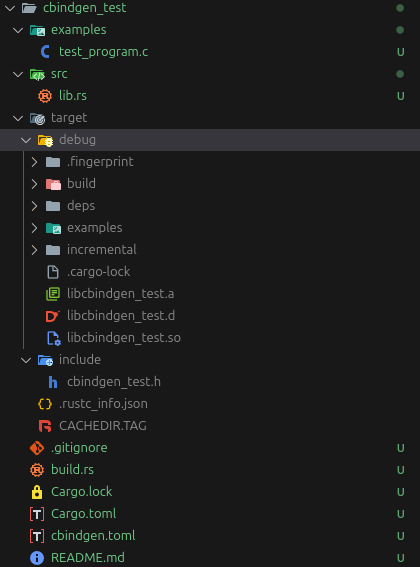
빌드하기
gcc -o test_program examples/test_program.c -L./target/debug -lcbindgen_test빌드의 결과물로 test_program이 생긴다.
test_program을 실행시키면 아래와 같은 에러가 발생하는데, 이는 실행 과정에서 LD_LIBRARY_PATH를 잡아주지 않아 발생한다.
./test_program: error while loading shared libraries: libcbindgen_test.so: cannot open shared object file: No such file or directoryld path를 포함시켜 실행시키면
LD_LIBRARY_PATH=./target/debug ./test_program다음과 같은 결과를 얻을 수 있다.
add_numbers(10, 5) = 15
square_number(10) = 100
해당 작업을 직접해보고 싶다면 https://github.com/Kim-JeongHan/cbindgen_test에서 테스트 해볼수 있다.
GitHub - Kim-JeongHan/cbindgen_test
Contribute to Kim-JeongHan/cbindgen_test development by creating an account on GitHub.
github.com
'프로그래밍 > Rust' 카테고리의 다른 글
| Rust설치, Cargo활용 및 유용한 확장(Vscode, IDE) (0) | 2025.09.03 |
|---|---|
| Rust-C++ 통합 : cbindgen과 Collision을 활용한 workflow (0) | 2025.09.02 |
| Corrosion : Rust와 CMake의 통합 (0) | 2025.09.01 |
| Rust에서의 Dispatch(Static dispatch vs dynamic dispatch) (5) | 2025.07.17 |
| Rust에서의 Zero-cost Abstraction (0) | 2025.07.17 |
